
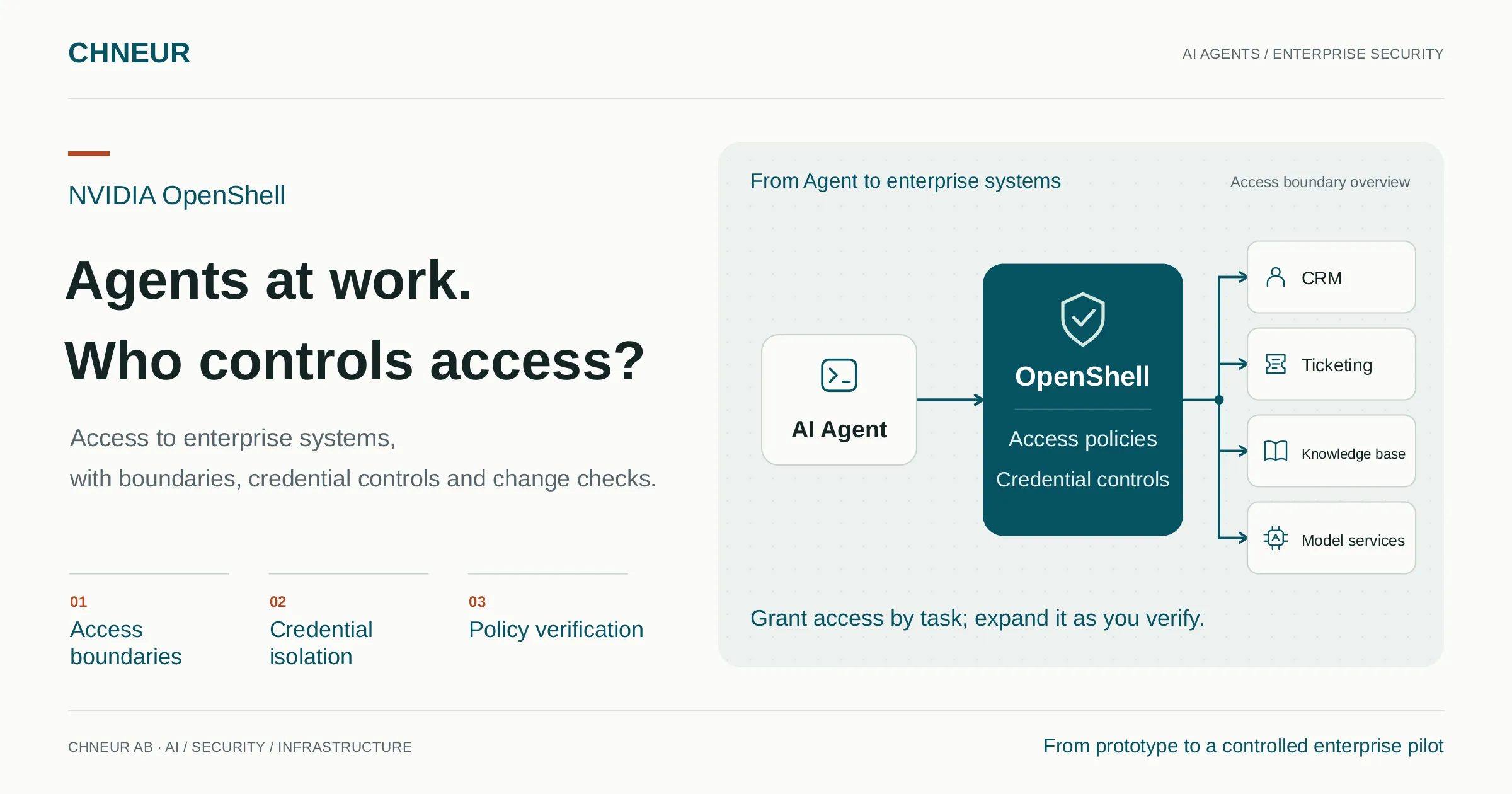
A customer service Agent can already read tickets, search a knowledge base and draft replies. The demo goes smoothly. The business team wants to connect it to the CRM, then let it update tickets and send emails.
At this point, several questions directly affect whether the project can move forward. Which customer data can it see? Where are the API keys stored? If malicious instructions in an email or web page try to persuade it to upload information, what can stop it? When another tool is added, who approves the new permissions?
Giving an Agent more responsibility means turning what it can do and what it can access into enforceable, verifiable rules.
NVIDIA OpenShell provides a runtime foundation for this step: it constrains Agent operations through sandboxes and access policies, keeps real credentials in controlled components, and supports checks of permission boundaries before policy changes. For teams moving from prototypes to real business use, it deserves careful evaluation.
How much access does a customer service Agent need?
Consider a customer service Agent about to connect to CRM and ticketing systems. Its first task can be clear: read relevant information for specified customers, consult previous tickets and draft a reply for review.
It needs some access to complete that task. It may not need to modify customer records, export contacts in bulk or send data to arbitrary external addresses.
These distinctions should be reflected in system configuration. Prompts can tell an Agent how to work, but its actual access must also be constrained by the runtime and business systems. Prompt injection in external content, incorrect tool calls or overly broad configuration can all push operations beyond the intended task.
Containers provide a foundation for isolation. Enterprises still need to determine which files programs inside a container can access, which services they can connect to, which APIs they can call and which credentials they can use.
OpenShell brings these controls into an Agent runtime, allowing teams to configure permissions around specific tasks and gradually expand the scope of operations they have verified.
Three OpenShell capabilities and their enterprise value
1. Express access as policy and give pilots clear boundaries
OpenShell sandbox policies can define file read and write access, process identity, and which programs may reach which network destinations. For supported request protocols, they can further constrain API requests, such as allowing certain read operations while prohibiting corresponding writes. Outbound connections must match allow rules. 1
In the customer service scenario, teams can configure the rules the Agent needs to access designated knowledge base and ticketing APIs, then test whether access to unrelated services is denied. The visibility of customer records remains governed by the CRM’s identity and data permissions.
This lets an enterprise define a more concrete pilot scope: allow the access needed for the task first, then expand permissions based on verification results. Security teams can review the actual rules, while business teams can understand what the current version is ready to do.
2. Keep real credentials outside the Agent to reduce exposure
Putting an API key directly in an Agent’s environment variables or configuration files gives the Agent process access to the real credential. Tool calls, debugging output or malicious content can then cause accidental exposure.
For credentials managed through an OpenShell provider and integrated through that mechanism, the Agent receives a placeholder reference. As a request passes through the proxy, the system checks whether the calling program and destination comply with the network policy, and whether the request endpoint falls within the credential’s bindings. Only after these checks pass does it resolve and inject the real credential before forwarding. 2
This lets an enterprise manage “which services may be called” separately from “where real credentials may be used.” Even if a placeholder reference is sent to an unbound endpoint, it cannot be exchanged for the real credential there.
The mechanism can reduce the risk of credentials entering the Agent’s context or output directly. Customer data that the Agent is already authorized to read still requires data minimization, output restrictions and approval workflows.
3. Check policies before expanding permissions
An Agent’s permissions tend to grow with business needs: today it only reads tickets; tomorrow it needs to create them; later it must connect to another service.
OpenShell’s Policy Prover supports formal checks of whether a candidate policy exceeds a specified boundary policy. An enterprise can, for example, define an upper limit on allowed access, then check whether an Agent’s policy remains within it. It also participates in risk checks for network rule changes proposed by Agents, helping identify newly introduced sensitive access. 3
This adds a repeatable check to permission changes, providing concrete evidence for reviewing requests to “allow a little more access.”
The guarantee has a defined scope: verification applies to policy features supported by the model. In v0.1.5, for example, boundary checks cover file access, process identity, Landlock settings, network connections and some REST request rules. GraphQL and MCP rules are outside the supported scope of that boundary check. Passing a check does not mean business operations will necessarily be correct or that the runtime has been fully validated.
Enterprises can incorporate this capability into their change process while retaining actual runtime tests and human review.
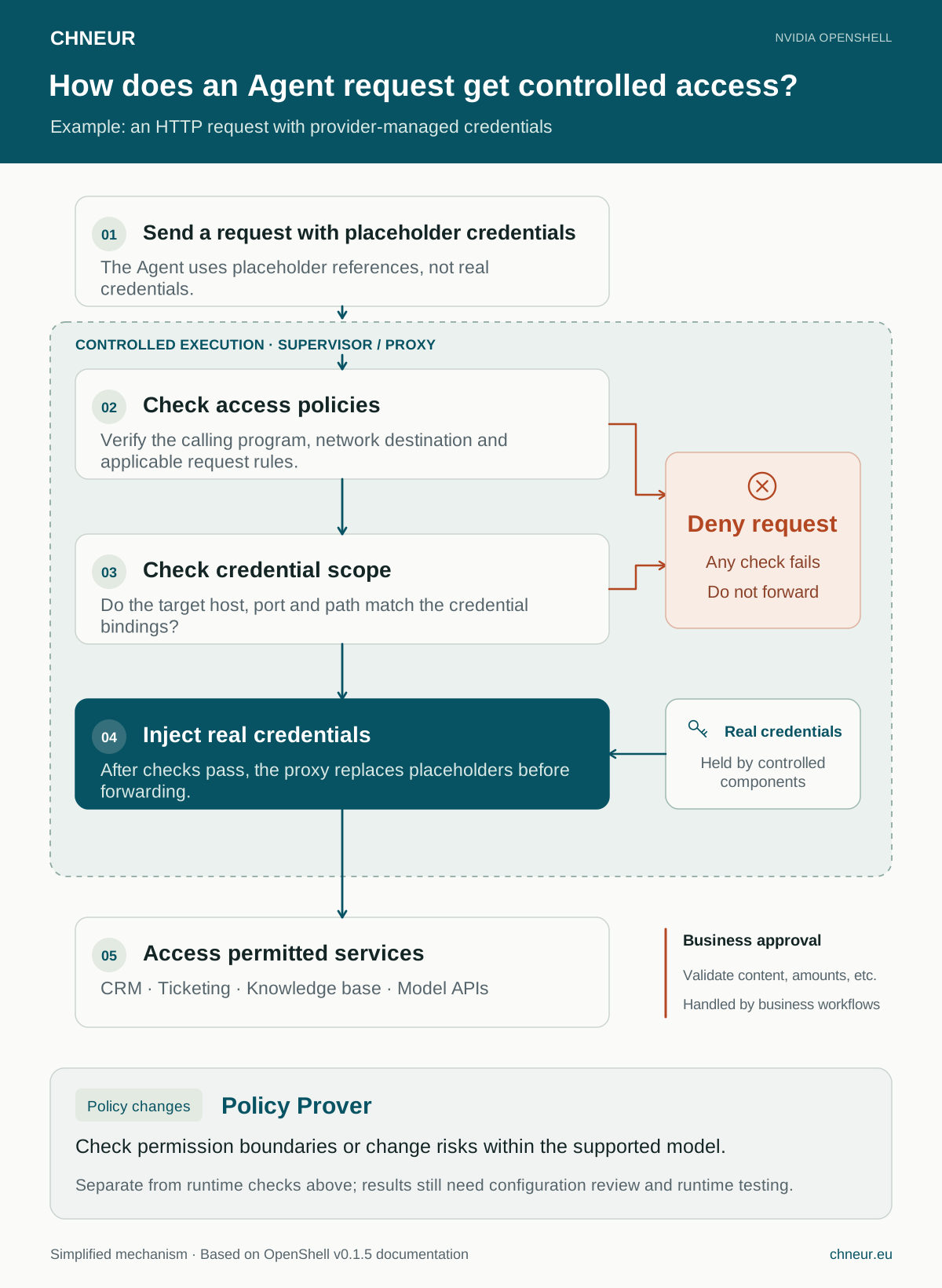
Runtime request checks, policy change verification and business approval have different responsibilities. Open the full-size diagram to zoom in.
Why evaluate these capabilities together?
An Agent project can implement some security controls itself. As more tools, business systems and teams become involved, credential handling, access rules and permission changes also become ongoing engineering work.
OpenShell’s value lies in putting multiple runtime controls on a shared foundation. Teams can define policies around business tasks, reuse management approaches across Agents, and clarify the responsibilities of application development and runtime access management.
Its architecture separates Agent workloads from a trusted supervisor, which handles network request checks and credential injection. The gateway manages sandboxes, policies and access. Together, these components form a control foundation that the enterprise must deploy and maintain. 4
For teams with an Agent prototype that is ready to connect to internal APIs or sensitive data, these controls directly affect how far a pilot can go. For enterprises where several teams develop Agents independently, a shared runtime foundation is also worth evaluating to reduce the need for each project to design similar mechanisms again.
How much development and maintenance work it can save depends on the existing platform, protocol compatibility and operational requirements. A clearly scoped pilot is a good way to assess that.
Design runtime boundaries and business approval together
Return to the customer service example: allowing an Agent to call an email API does not mean every email should be sent immediately. Even if the destination and API comply with policy, the message may still contain incorrect customer information.
The same applies to purchasing and finance. A permitted payment request may still specify the wrong recipient account. Business systems must continue to enforce amount limits, account validation, approval and authorization of operations.
Deployment should therefore make two responsibilities explicit: OpenShell constrains the runtime resources and request channels an Agent can use; business systems and workflows determine whether a particular operation should be performed. Enterprises also need to protect management components, assign operational permissions and include relevant logs in their review processes.
With this division, OpenShell’s protections become easier to verify, and the additional capabilities that need to be built become clearer. Compliance assessment must likewise consider the complete business process and management measures.
Start with a workflow that can be evaluated
In our documented local work with WSL2, Docker Desktop and OpenShell 0.1.5, we have successfully started a sandbox and used OpenCode inside it to call a model through OpenRouter. The networking, sandbox startup and credential configuration issues are covered in Running OpenShell on WSL2: Docker Desktop Networking and NAT Mode.
This work verified the basic runtime path. Enforcement of tool permissions, access to internal services and long-term runtime behavior still need further testing.
For an enterprise pilot, we recommend choosing a task that delivers business value and has permissions that are easy to define, such as “read specified tickets and draft replies.” Acceptance can focus on the following checks:
| Area | Questions to answer |
|---|---|
| Business outcome | Are the drafts useful, and how much time do human review and editing take? |
| Required access | Do the files, models and business APIs needed for the task work correctly? |
| Prohibited access | Are test requests to unauthorized files, external addresses and write APIs denied as expected? |
| Credential use | Does the Agent only encounter placeholder references, and can credentials be restricted to specified endpoints? |
| Permission changes | When a new API is added, who reviews the rules, how are boundaries checked, and how is the change confirmed to be effective? |
| Operations | Can failures be diagnosed, and have sandbox restarts, credential updates and recovery procedures been verified? |
These results help teams decide what comes next: improve the current workflow, allow a small number of new operations, or first strengthen permissions and approvals in the business systems.
Make your actual Agent scenario the next conversation
CHNEUR AB is an engineering consultancy based in Sweden, working across enterprise networking, security, cloud infrastructure, AI workflows and business system integration. Connecting Agents to enterprise environments requires these capabilities to be considered together within a single workflow.
If your team already has a prototype and is evaluating access to CRM, ticketing, a knowledge base or internal APIs, bring three things to the conversation: what you want the Agent to accomplish, which systems it needs to access, and which operations must require human confirmation.
We can use that context to discuss permission and credential boundaries, evaluate where OpenShell fits, and jointly define the pilot’s scope, acceptance criteria and implementation steps.
Contact CHNEUR to discuss your Agent deployment
The technical descriptions in this article are based on the official NVIDIA OpenShell v0.1.5 documentation, consulted on 23 October 2026.